
Download AutoDWG DXF Viewer – Free DXF Viewer for Windows
Overview
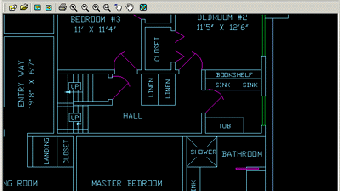
AutoDWG DXF Viewer is a lightweight, trial‑version program created by AutoDWG specifically for Windows users who need a reliable way to open, view, and navigate DXF files without investing in a full‑featured CAD suite. The application targets architects, engineers, designers, and hobbyists who receive DXF drawings from collaborators or clients and simply need to inspect the geometry, layers, and annotations. With a clean, intuitive interface, the viewer eliminates the learning curve often associated with heavyweight CAD tools while still delivering accurate rendering of complex drawings. Because it is a trial version, users can evaluate its performance and decide whether to upgrade to the paid AutoDWG DXF Converter for editing and conversion capabilities. The viewer supports both 2‑D and basic 3‑D DXF entities, allowing you to zoom, pan, and rotate models effortlessly. It also includes a handy measurement tool that lets you quickly check distances and angles directly on the drawing, which is essential for design verification. Security‑focused users will appreciate that the program runs locally, meaning your proprietary designs never leave your machine. Overall, AutoDWG DXF Viewer offers a cost‑effective, secure, and user‑friendly solution for anyone who needs to view DXF files on a Windows PC.
Key Features of AutoDWG DXF Viewer
- Native DXF rendering – displays both 2‑D and basic 3‑D entities without loss of detail.
- Intuitive navigation – zoom, pan, and rotate with mouse wheel or toolbar buttons.
- Layer control – turn layers on/off, change visibility, and isolate specific parts of a drawing.
- Measurement tools – distance, radius, and angle calculations directly on the canvas.
- High‑resolution display – supports Retina and high‑DPI monitors for crisp line work.
- Search function – locate blocks, texts, or specific layers quickly.
- Print preview – generate PDFs or send drawings to a printer while preserving scale.
- Lightweight installation – under 30 MB footprint, ideal for older PCs.
- Secure local processing – no internet connection required for viewing.
- Trial mode – full functionality for 30 days, with an easy upgrade path.
Installation, Compatibility, and First‑Time Usage
Installing AutoDWG DXF Viewer is straightforward. After downloading the installer from the official AutoDWG website, double‑click the .exe file and follow the on‑screen prompts. The wizard will ask you to accept the license agreement, choose an installation folder (the default C:\Program Files\AutoDWG\DXF Viewer works well), and optionally create a desktop shortcut. Once the process completes, launch the application from the Start menu or the shortcut.
Compatibility (itemprop="operatingSystem"): The viewer is built for Windows 10, Windows 11, and also runs on Windows 8.1 and Windows 7 (SP1) with .NET Framework 4.7 or later installed. It supports both 32‑bit and 64‑bit architectures, though the 64‑bit version is recommended for better performance on modern hardware. System requirements are modest: a 1 GHz processor, 2 GB RAM, and at least 30 MB of free disk space for the program itself (additional space needed for the DXF files you open).
Upon first launch, you will be greeted by a welcome screen offering a quick tour. Click “Open File” or drag‑and‑drop a .dxf file onto the window. The viewer instantly parses the file and displays the drawing in the main canvas. Use the toolbar at the top to toggle layers, activate the measurement tools, or switch to full‑screen mode. The “View” menu provides preset zoom levels (Fit, 100 %, 200 %) and a “Zoom to Extents” option that automatically frames the entire drawing. If you encounter a very large file, the program may show a progress bar while loading; this is normal and usually completes within seconds for most professional drawings.
The trial version places a subtle watermark on the status bar after the 30‑day period, but all core viewing functions remain usable. Should you need to convert DXF to other formats (DWG, PDF, SVG), the full AutoDWG suite offers seamless upgrades from the viewer interface.
Pros, Cons, Frequently Asked Questions, and Final Verdict
Pros
- Free trial with full viewing capabilities.
- Fast, lightweight installation and low system requirements.
- Accurate rendering of complex DXF files.
- Built‑in measurement tools eliminate the need for extra software.
- No internet connection required – keeps proprietary designs secure.
Cons
- Limited to viewing only – no editing or conversion in the trial.
- Watermark appears after trial expires, which may be distracting.
- Only available for Windows; no macOS, Android, or iOS version.
- Advanced 3‑D navigation is basic compared to full CAD packages.
Frequently Asked Questions
Can AutoDWG DXF Viewer open DWG files?
No. The viewer is designed solely for DXF files. To open DWG files you would need the full AutoDWG CAD suite or a separate DWG viewer.
Is the trial version truly free, or does it require a credit card?
The 30‑day trial is completely free and does not ask for payment information. You can download and use it without providing a credit card.
What is the maximum file size AutoDWG DXF Viewer can handle?
There is no hard‑coded limit, but files larger than 200 MB may load more slowly depending on your hardware. The program is optimized for typical engineering drawings ranging from a few kilobytes to several dozen megabytes.
Does the viewer support layer colors and line types?
Yes. Layer colors, line weights, and basic line types (solid, dashed, dotted) are displayed accurately, and you can toggle individual layers on or off from the Layer Manager.
Can I print directly from AutoDWG DXF Viewer?
Absolutely. The Print dialog lets you set page size, scale, and orientation. You can also export the view as a PDF for sharing with colleagues.
Final Verdict & Call to Action
AutoDWG DXF Viewer fills a niche that many CAD professionals overlook – a fast, secure, and completely free way to open and inspect DXF drawings on Windows. While it lacks editing features, its robust rendering engine, measurement tools, and layer management make it an indispensable companion for design reviews, client presentations, and field checks. The trial’s 30‑day window is generous enough to test on multiple projects, and the upgrade path to the full AutoDWG suite is seamless if you later need conversion or editing capabilities. For anyone who frequently receives DXF files but does not own a full CAD license, this viewer is a pragmatic, cost‑effective solution.
Ready to view your DXF files without delay? Download AutoDWG DXF Viewer now and start exploring your designs with confidence. If you find the tool valuable, consider upgrading to the full AutoDWG suite for editing, conversion, and batch processing features.







